woman_with_headset_smiling

Client for your PC/Mac

 Great overview. Efficient communication and collaboration

Efficient communication and collaboration from your desktop

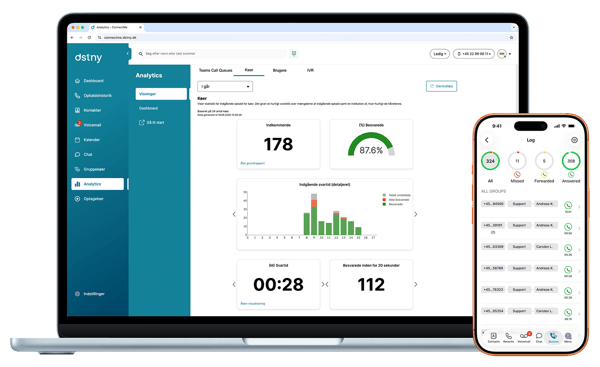
All essential communication and collaboration features are gathered in your PC/Mac client – Connect Client 3.0.

The PC/Mac client for Connect 3.0 is your personal desktop client with a softphone on your computer, giving you full control over your daily communication and collaboration with colleagues and external contacts. The client streamlines your communication and makes collaboration easier and more intuitive.

In addition, the solution can include an attendant view in the Connect client, providing receptionists with a complete overview of all incoming and outgoing calls, making call handling even more efficient and streamlined.

Easy and efficient communication and collaboration from your desktop

plus-regular
 More than 250 telephony features
people-arrows-regular

All colleagues and customers within two clicks

street-view-regular

 View employees’ availability status

phone-arrow-down-left-regular
 View employees’ availability status
calendar-range-regular
 Calendar with future availability
message-lines
 Chat, MMS, and SMS

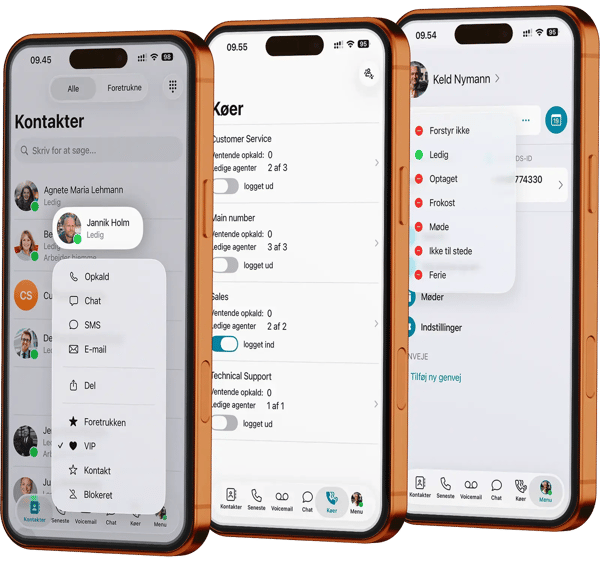
Selected features in the PC/Mac client for Connect 3.0

dstny_connect_client_info

Contacts

klient_kontakter

Log

klient_log


Voicemail

klient_voicemail

Queue

klient_kø


Agent statistics

klient_agent_stat

Group statistics

klient_gruppe_log


User functionality in Connect 3.0

IP phonePC-/Mac clientMobile app
Self-service (status and personal settings)
 Receive and reject calls
 Call transfer with and without announcement
 Simultaneous ringing
 Call waiting / call barging
 Call log / history
 Inbox for voicemails and call recordings
 Ad-hoc call recording (voice recording)
 Call pickup
Softphone
 Calendar with status view and voicemail based on status
 Forwarding to voicemail
Status display (meeting, lunch, busy, DND, etc.)
Synchronization of Outlook contacts 
Call group overview 
Supervisor management of call groups 
SMS/email to contacts 
Select caller ID for outgoing calls (one number)
Click to dial
Retrieve/move calls to/from IP phone or mobile
URL lookup on incoming calls
Mobile calls via Wi-Fi/data

Let's get in touch

Would you like to learn more about the client for PC and Mac? Fill out the contact form to get in touch with our advisory team. 
2026-04-17 14:25:36