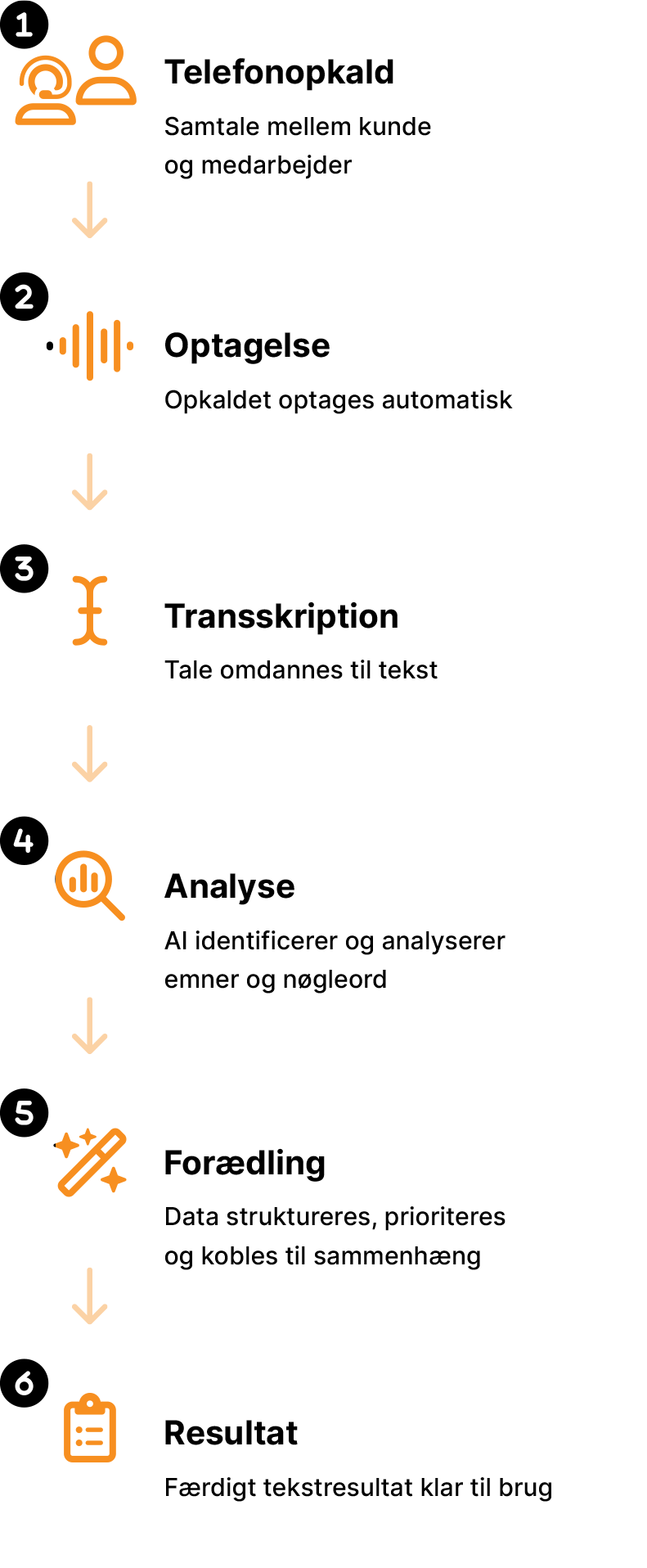
Conversation between customer and employee.

Are you leveraging AI to automate tasks?
Discover our new groundbreaking AI-powered call transcription service.
This is what ScriptIQ does for you

1. Phone call
2. Recording
The call is recorded automatically – with no additional action required.

3. Transcription
Speech is converted into text using AI.

4. Analysis
AI identifies and analyses topics, keywords, and content in the conversation.

5. Refinement
Data is structured, prioritised, and placed in the right context.
6. Result
A finished text output, ready to use in your daily work.
Det gør ScriptIQ for dig

Dstny’s AI transcription service – ScriptIQ
ScriptIQ converts customer conversations into text and automatically analyzes and refines the content into a structured final summary. The text can be used to convert conversation data into tickets and follow-up actions. Through API integrations with CRM, support, and knowledge base systems, insights are transferred directly from phone calls into your core systems.
Practical features tailored for IT:
- Follow-up communication and task lists:
The AI sends summaries, guides, or follow-up emails to the user – based on the conversation. - Automatic ticket creation and categorization:
Bug reports and support inquiries are captured and converted into tickets with priority, tags, and full context. - Internal documentation and knowledge base:
Solutions and issues are transcribed and structured into an internal wiki/FAQ – ready for reuse. - Product feedback and bug tracking:
The AI identifies and highlights recurring complaints, errors, and feature requests directly from conversations. - Onboarding and coaching of support agents:
New hires learn through real conversation examples and AI-assisted analysis of communication techniques and technical accuracy.
Potential benefits of ScriptIQ

Better documentation and higher support quality
- Tickets are created quickly and accurately – with all necessary information included.
- Fewer misunderstandings and less duplicate work between support and development teams.
Data-driven product development
- Conversation data provides insights into bugs, UX challenges, and customer needs.
- The AI creates feedback loops from customers to the product team.

Increased customer satisfaction and retention
- Faster and more precise support → lower churn and higher NPS.
- Professional communication and follow-up build trust.

Faster onboarding and skills development
- Real conversation insights strengthen learning and quality assurance.
- Time savings make it possible to serve more customers – and serve them better.
Example 1 – Technical support call
- A user experiences an issue and contacts support.
- The AI creates a ticket, logs the problem, and sends an email with the solution and relevant links.
Example 2 – Feature request
- The customer requests a new feature.
- The AI recognizes it as a “feature request” and forwards it to the product team with full context.
Example 3 – On-boarding
- A new support agent is trained using transcribed conversations and learns how similar cases were resolved.
- The AI evaluates the interaction and suggests improvements in technical explanations and customer engagement.
Financial benefits
- 20–40% faster handling of support inquiries.
- Lower error rates in documentation and follow-up.
- Higher first-call resolution and fewer escalations.
- Faster onboarding (up to 50% faster compared to traditional training).